Kiki.bet app and mobile browser options
 Available in US
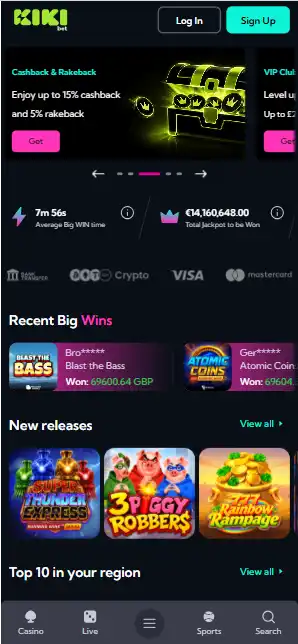
Kiki.bet’s mobile service is described as a responsive website with an optional browser-installed progressive web app (PWA). The menu includes Casino, Live, Sports and Search; the installed version provides a home-screen shortcut to the web service.
A PWA is not necessarily a native iOS or Android app. Installation depends on the phone, browser and the site’s current support for home-screen installation. Mobile access does not override geographic or account restrictions.
Table of Contents
- Mobile access at a glance
- Four routes organise the mobile website
- A browser-installed PWA stands in for a native casino app
- iPhone and iOS use the home-screen route
- Android uses Chrome for installation
- Mobile casino navigation carries the game catalogue
- Live chat stays part of Kiki.bet mobile customer support
- Mobile browsing and PWA access share one service
Mobile access at a glance
The reviewed interface shows Casino, Live, Sports and Search as the main mobile destinations. Support information also refers to live chat and two separate email addresses for account support and general enquiries. The PWA and browser versions use the same underlying site.
The home-screen installation option is managed through a supported browser, rather than through a separate app-store download. Availability of that option can change with browser settings and website configuration; private browsing modes may limit it.
Four routes organise the mobile website
Kiki.bet places four navigation controls along the bottom of its mobile interface. Casino opens the main game catalogue, Live focuses on dealer-hosted games, Sports leads to the sportsbook, and Search provides a route for finding content. The labels remain attached to the same brand products as those shown in the desktop catalogue.
- Casino: Kiki.bet groups slots, Instant games, table games and jackpots in its casino selection.
- Live: the live dealer category covers traditional table formats and hosted games.
- Sports: the Betby-powered sportsbook is a separate product area in the same interface.
- Search: the mobile interface supplies a search entry alongside the main content categories.
The lower menu uses short labels that fit a phone screen. The reviewed desktop catalogue listed 3,025 games, but that is not a verified current mobile count. The same categories group slots, table games and shorter instant rounds.
A browser-installed PWA stands in for a native casino app
The Kikibet App is a progressive web app. PWA installation creates a home-screen launch point for the browser-based service, without a separate native iOS or Android store package. Kiki.bet uses this installation model on both phone platforms; the browser remains the underlying environment for the interface.
| Access format | How it works |
|---|---|
| Mobile website | Responsive browser pages with Casino, Live, Sports and Search navigation |
| Kikibet App PWA | Browser installation creates an app-style home-screen entry |
| iOS | Share menu and Add to Home Screen |
| Android | Chrome menu and Install |
Kiki.bet’s app download language therefore refers to a browser installation. It offers no separately located APK or native store app within its mobile access model. An app icon on the phone opens the PWA, while the ordinary site continues to run as mobile browser pages.
iPhone and iOS use the home-screen route
For iOS, Kiki.bet uses the browser share controls to install its PWA. The interface sequence runs through Share, then View More, then Add to Home Screen and Add. These are browser commands rather than pages of a separate casino-app store. The resulting Kikibet App icon appears alongside other phone home-screen entries.
- The Kiki.bet mobile website loads in a normal iPhone browser session.
- The phone’s Share menu provides the next browser control.
- View More exposes the Add to Home Screen action.
- Add completes the browser installation and creates the home-screen entry.
The mobile site itself remains responsive regardless of whether the home-screen shortcut is present. The installation path is part of Kiki.bet’s PWA feature, and the same casino, live dealer and sports navigation exists in the standard mobile browser view. Private browsing prevents installation under the operator’s PWA procedure.
Android uses Chrome for installation
Kiki.bet supplies the PWA installation flow through Chrome on Android. Its browser procedure opens the three-dot menu and uses Add to Home screen followed by Install. The site can also present an Install control for the same PWA function. The native Android package-store route is not part of that process.
- A normal Chrome session displays the mobile website and its lower navigation bar.
- The three-dot menu contains the Add to Home screen option for the Kiki.bet PWA.
- Install completes the browser-managed application entry.
- The resulting icon opens the Kikibet App presentation of the site.
Android PWA access depends on the browser’s installation mechanism; the casino catalogue remains a browser-delivered service. The Kiki.bet instructions exclude incognito mode from the installation process. Standard website browsing is a separate route that does not require a home-screen icon.
Mobile casino navigation carries the game catalogue
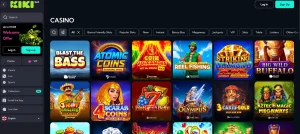
The Kiki.bet mobile casino retains the Casino, Live and Sports divisions. Casino groups slot and instant titles, while Live displays hosted games such as roulette, blackjack and baccarat. The sportsbook is a Betby product, separated from the casino lobby by its mobile navigation label.
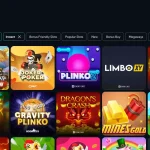
The reviewed casino games catalogue names studios including Pragmatic Play, Play’n GO, BGaming and Hacksaw Gaming. An earlier snapshot listed 46 providers, but the current number has not been confirmed. The Instant category includes games such as Aviator, Mines and Plinko; their presentation is adapted for phone screens.
Search gives the mobile experience another navigation path beyond browsing by game type. This route sits alongside the main casino and sports categories rather than functioning as a separate gaming product.
Live chat stays part of Kiki.bet mobile customer support
Kiki.bet supplies live chat around the clock. The same service is available as a support channel for the website and its PWA-based mobile presentation. For written enquiries, Kiki.bet uses [email protected] for customer support and [email protected] for general or organisational matters.
- Live chat: Kiki.bet maintains a 24/7 route for account and product enquiries.
- Support email: [email protected] serves customer-service messages.
- General email: [email protected] handles broader organisational contact.
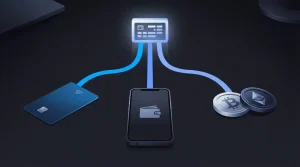
These contact routes accompany the same account model used by the brand’s web-based casino. Kiki.bet also applies first-withdrawal verification and same-name payment rules, which remain account conditions across device types. Kiki.bet accepts cards, digital wallets and crypto through its payment methods. The operator then applies a two-working-day decision window to its withdrawal review process.
Mobile browsing and PWA access share one service
Both the browser view and the installed PWA lead to the same underlying casino pages. A home-screen icon changes how the site launches, not which rules govern games, deposits or user eligibility.
The key mobile considerations are menu readability, access to account help and the reliability of navigation on smaller screens. The presence of a PWA shortcut should not be mistaken for a separate, licensed mobile product.